
Pregnancy Track - Bump Journey
LUONG HONG QUANGParenting
0.00.00 Reviews
- Version
- 1.0.8
- Installs
- 500.00K
- Age Rating
- Everyone
Screenshots

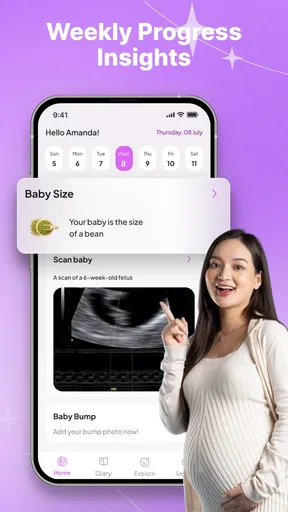
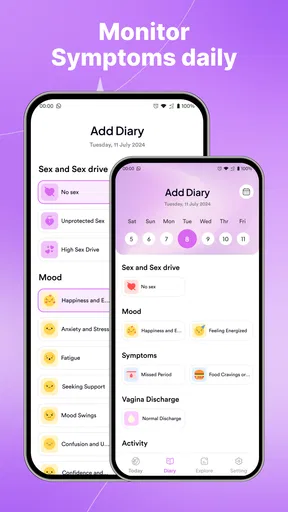
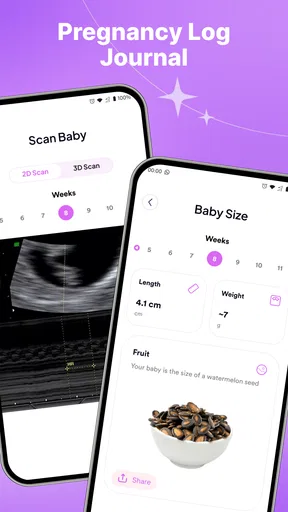
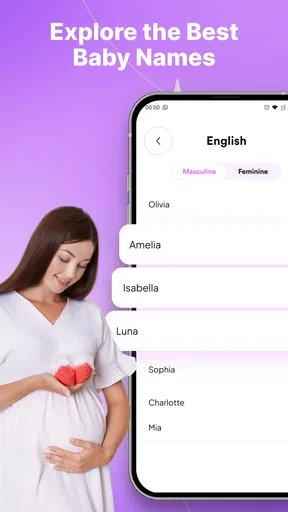
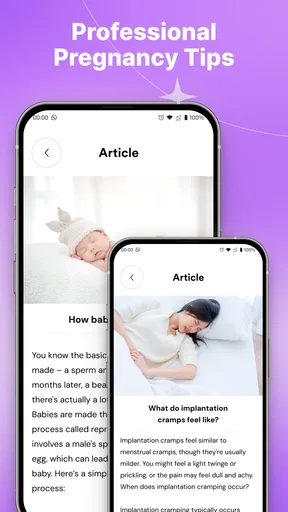
Our Review of Pregnancy Track - Bump Journey
 Analysis by Appyee
Pregnancy planning can quickly turn into a pile of notes, calendar reminders, saved articles, and questions for the next appointment. Pregnancy Track - Bump Journey takes a simpler approach: it brings weekly pregnancy progress, due-date planning, a checklist, and a bump log into one parenting app. I found that its main appeal is not trying to replace every pregnancy resource, but giving everyday tracking a clear home on your phone.
That focus matters when choosing between a dedicated pregnancy tracker, a general calendar, a notes app, or a large information-heavy pregnancy platform. I would look at three things first: whether the app makes regular tracking easy, whether its organization matches the way you think about pregnancy, and whether you want a lightweight companion rather than a complete medical reference. On those points, this app is most interesting for people who want a calm routine they can maintain without turning every day into a research session.
How I would decide whether it fits
The first decision is how much structure you actually need. If you mainly want to know where you are in the pregnancy journey, keep an eye on the due date, and remember practical preparation tasks, a focused tracker can be more useful than a broad app filled with articles and extra sections. The weekly format gives you a natural reason to check in without requiring constant input.
The second decision is whether you prefer personal logging or passive reading. The bump log is especially relevant here. It gives the experience a personal side, because you can record changes over time instead of only consuming general information. I see that as a useful distinction for someone who wants a simple record to look back on or share privately with a partner.
The third decision is tolerance for manual organization. A checklist is helpful only if you keep it current. I would not install this expecting it to make every pregnancy task automatic. Its value comes from putting planning prompts and personal notes in one place, so you spend less time deciding where to store them.
There is also a practical compatibility question. The app is free, available for Everyone, and works from Android 7.0 onward. That makes it approachable for people using an older Android phone, rather than limiting the experience to recent devices. It was released on March 18, 2026, and the current version is 1.0.7, so I would keep expectations realistic: this feels like a focused tool that can grow, not a mature digital health suite that does everything.
Its audience is broad enough to include first-time parents, people who want a second pregnancy journal, and partners who need a shared reminder of what is coming next. Still, I would skip it if your main requirement is clinical guidance, appointment management, detailed symptom analysis, or direct communication with healthcare professionals. Those needs call for a different category of product and should not be confused with a personal tracking app.
The weekly view is useful when you want a routine
The strongest idea here is the week-by-week structure. Pregnancy can feel abstract when you think about the entire timeline at once. A weekly view reduces that mental load by giving you a smaller checkpoint: see where you are, review the growth information, update your notes, and consider the next practical item on the checklist.
I would use it at the same time each week rather than opening it repeatedly throughout the day. For example, a quiet weekend check-in could become a small household routine. I could review the current stage, add a bump note, mark one preparation task, and then write down a question for my next appointment in a separate note if needed. That workflow keeps the app useful without making it feel like another obligation.
The due-date element also works best as an orientation tool. It gives the weekly journey a fixed destination and helps turn a general sense of waiting into a sequence of stages. I would use it for planning conversations, shopping decisions, and personal milestones, while treating medical dates and clinical recommendations as matters to confirm with a qualified professional.
One non-obvious advantage of combining the due date and checklist is that planning becomes easier to pace. Instead of making a long list during one burst of anxiety, you can look at what needs attention now and leave later tasks for later. That is a better fit for real life, where energy and concentration can change from week to week.
The bump log adds personal value
Many pregnancy tools concentrate on information, but a bump log changes the app from a reference screen into a personal record. I like that distinction because it gives you a reason to return even when there is no new task to complete. A short note can capture how you felt, what changed, or what you want to remember.
My advice would be to keep entries consistent rather than lengthy. A brief weekly note is more sustainable than trying to write a detailed diary every day. You could use the same small pattern each time: a sentence about how you feel, a sentence about a visible change, and a reminder of something you want to ask or prepare. That creates a useful timeline without turning the log into homework.
The log can also help separate memory from medical interpretation. You can record an experience in your own words without assuming the app is diagnosing anything. If something concerns you, the note can help you explain it clearly at an appointment, but the app should remain the place where you document personal observations, not where you seek urgent answers.
For a partner, the bump log may offer a gentle way to stay involved. Sharing a weekly update can be more meaningful than sending a generic reminder, especially when both people are busy. I would still be careful with privacy when using any personal journal on a shared device, and I would avoid entering information that you would not want visible to someone who can access the phone.
The checklist is strongest when you make it concrete
A checklist sounds basic, but its usefulness depends on how you use it. I would not treat it as a complete master plan for pregnancy. Instead, I would turn each item into a decision with a clear next action. “Prepare the nursery,” for example, is too broad to be motivating. A smaller interpretation such as reviewing storage, choosing what must be purchased, or checking what you already own is easier to complete.
This is one of the app’s practical trade-offs. A built-in checklist can reduce the friction of starting, but it may not match every family’s timeline, culture, budget, or medical situation. I would use it as a framework and add my own parallel notes for personal appointments, questions, household responsibilities, and conversations with family.
A useful workflow is to review the checklist immediately after checking the weekly progress. That order matters. The weekly context tells you what deserves attention, while the checklist turns that context into action. If you open the checklist first, it is easier to feel overwhelmed by everything that still remains.
I would also avoid marking tasks complete just because you started them. Keeping “chosen,” “ordered,” and “finished” mentally separate prevents a false sense of progress. If the app offers only a simple completion style, use your bump log or another note for details that need follow-up. The app can hold the high-level plan while your notes hold the exceptions.
Where this app wins over broader pregnancy platforms
In my view, this app wins through concentration. Its core promise stays close to the daily questions many parents actually have: where am I in the journey, what is happening with the baby’s growth, what should I remember, and what do I want to record? That is easier to understand than an app that mixes tracking with a large content library, shopping area, community feed, and many unrelated tools.
A focused design can also make a difference during tired moments. When you have only a few minutes, a weekly update and a short checklist are less demanding than browsing through endless content. I would choose this style for someone who is easily distracted by too many tabs or who wants a private routine rather than a social experience.
The free price strengthens that decision. You can try the basic workflow without making a financial commitment, which is useful because the right pregnancy tracker is often a matter of personal rhythm. Some people enjoy daily detail; others want one calm weekly check-in. A free app lets you discover which group you belong to before investing time or money in a more elaborate system.
The developer, LUONG HONG QUANG, has kept the product identity straightforward. I do not read it as an attempt to be a hospital tool or a replacement for professional care. I read it as a personal organizer for pregnancy milestones, preparation, and memories. That narrower identity is a strength when your needs are narrow too.
Where another category may fit better
A general calendar is still better for appointments, work commitments, transport, and reminders that involve other people. Pregnancy Track - Bump Journey can help you think about preparation, but I would not rely on it as the only calendar for medical visits or time-sensitive household plans. A calendar is built around dates and alerts; this app is built around the pregnancy journey and personal tracking.
A notes app may be better if your priority is free-form journaling. If you want long entries, voice notes, scanned documents, or detailed lists organized into many folders, a dedicated notes tool will probably offer more flexibility. The advantage here is not unlimited writing; it is the connection between a weekly stage, a due date, a checklist, and a bump record.
A medical or evidence-focused pregnancy resource may be the better choice when you need detailed explanations, symptom education, medication questions, or guidance tailored to a specific condition. I would not use this app to settle a health concern. Its growth information can support general awareness, but it should not replace advice from a midwife, doctor, or other qualified professional.
Some parents may also prefer a family organizer if several people need to assign tasks, share shopping responsibilities, and coordinate appointments. The pregnancy tracker can be the personal center of your experience, while a shared planning tool handles logistics. Trying to force one app to perform both jobs often creates more work, not less.
This comparison reveals the main limitation: the app’s simplicity can feel restrictive if you want deep customization. A person who enjoys detailed charts, extensive history, or multiple health measurements may quickly outgrow a focused tracker. That is not a flaw for everyone, but it is an important trade-off before you build your routine around it.
What switching to it really involves
Moving from scattered notes to a dedicated tracker is not technically difficult, but it does require a small reset. I would begin by entering only the information needed to orient the weekly journey and due date. Then I would decide which existing notes are genuinely useful. Copying every old reminder into a new checklist can recreate the clutter you were trying to escape.
The cost of switching is mainly attention. You need to remember to open the app, keep the checklist meaningful, and make bump entries regularly enough that the record has continuity. If you already have a reliable system, changing tools may not improve anything. The switch makes sense when your current method is fragmented or when pregnancy-specific structure would help you stay engaged.
There is also a continuity consideration. A pregnancy tracker is naturally time-limited, while a general notes app can remain useful for years. I would keep important personal records in a way that remains accessible beyond this particular pregnancy journey. Use the app for convenient tracking, but do not assume that one mobile tool should become the permanent archive of every meaningful detail.
For someone with an older Android phone, the minimum requirement of Android 7.0 makes the barrier relatively low. The app is also free, so the practical test is simple: use it for a few weekly check-ins and see whether the combination of growth information, due-date orientation, checklist planning, and bump logging reduces mental clutter. If it does not, switching back costs little beyond the time spent trying it.
A realistic week-by-week routine
Imagine reaching a new pregnancy week after a busy stretch at work. Instead of opening several apps, you open this one for a short review. You check the current stage and baby-growth information, look at the due-date position, and scan the checklist for one task that is genuinely relevant. You then add a few lines to the bump log about how the week felt and what you want to remember.
That routine is small enough to survive a tired week. It also creates three different kinds of value: orientation from the weekly view, action from the checklist, and memory from the bump log. The important insight is that you do not need to complete every section every time. On a difficult week, a short note may be enough. On a more energetic week, you can use the checklist to make progress.
I would add a separate habit of writing appointment questions before the visit, then reviewing the bump log afterward to record what you learned. This keeps the app involved in preparation and reflection without pretending to manage the clinical side. It is a practical division of labor: the app supports your organization, while healthcare professionals handle medical decisions.
Another useful approach is to make the checklist a conversation starter with a partner. Rather than presenting a long list of unfinished work, choose one item and decide together what “done” means. That turns the app from a private reminder into a prompt for shared planning, while keeping the responsibility manageable.
Who should install it, and who should pass
I would recommend it to a first-time parent who wants a clear weekly rhythm, a person who likes keeping a personal pregnancy record, or anyone whose current system is spread across paper notes and several unrelated apps. It is also a sensible low-risk trial for someone who wants a free Android option that does not require a recent phone.
I would be more cautious for users who want a full medical information center, advanced health analytics, detailed appointment management, or a collaborative family workspace. Those expectations belong to other categories. Installing this app with the wrong goal could make its simplicity feel like a missing feature rather than an intentional design choice.
The Everyone content rating makes it suitable as a general-purpose parenting companion, but that should not be mistaken for medical endorsement or personalized care. Pregnancy information can be sensitive and individual. I would use the app to organize my experience and prepare better questions, not to make decisions that should involve a healthcare professional.
The install base of over one hundred thousand suggests that the app has reached a meaningful group of users, but I would still judge it by personal usefulness rather than popularity. The current version, 1.0.7, is worth trying with an open mind, especially if you prefer focused tools. Just keep your expectations aligned with its central job: tracking and organizing a pregnancy journey.
My recommendation after weighing the trade-offs
My recommendation is positive for the right user. Pregnancy Track - Bump Journey is a straightforward parenting app that makes sense when you want weekly orientation, a due-date anchor, practical checklist support, and a personal bump record in one place. I especially like the way those elements can form a repeatable weekly ritual instead of encouraging constant checking.
I would not call it the best single app for every pregnancy need. A calendar, notes tool, shared organizer, or medically focused resource may be better for specific jobs. The smartest setup may be to let this app handle the personal journey while another trusted tool handles appointments or shared household coordination.
Because it is free and supports Android 7.0 and later, trying it is easy. Give it a few honest weekly check-ins rather than judging it after one opening. If the checklist helps you choose realistic next steps and the bump log makes the experience feel more personal, it has earned a place on your phone. If you need deep customization or clinical detail, move on without guilt.
For me, the app’s value comes from restraint. It does not need to become a complete digital pregnancy universe to be useful. As a focused companion from LUONG HONG QUANG, it offers a clear way to pause, see where you are, plan what matters next, and preserve a few memories along the way. If that is the kind of support you want, this is a practical app to try.
Privacy and Permissions
See what permissions an app requests and how it handles your data.
- Photos/Media/Files
- read the contents of your USB storage, modify or delete the contents of your USB storage
- Storage
- read the contents of your USB storage, modify or delete the contents of your USB storage
- Camera
- take pictures and videos
- Wi-Fi connection information
- view Wi-Fi connections
- Other
- view network connections, full network access, prevent device from sleeping, Google Play license check
Verdict
Strengths of Pregnancy Track - Bump Journey
- Clear week-by-week pregnancy timeline with useful milestone reminders.
- Simple interface makes daily symptom and health tracking easy.
- Helpful preparation tools for appointments, tests, and important dates.
- Personalized content can make pregnancy information feel more relevant.
- Convenient way to keep notes and monitor changes throughout pregnancy.
Limitations of Pregnancy Track - Bump Journey
- Some features may require a subscription or in-app purchases.
- Information should not replace advice from a qualified healthcare professional.
- Tracking accuracy depends on entering symptoms and updates consistently.
- Notifications may become repetitive during longer periods of use.
- Privacy settings should be reviewed before storing sensitive pregnancy data.
Similar Picks in This Category
View All
Family Space
Motorola Mobility LLC.3.9

شرطة الأطفال - مكالمة وهمية
Oub Apps4.1

Findmykids: Parental Control
LETEM LTD4.6

Pregnancy + | Tracker App
Philips Electronics UK Limited4.8

Policía de niños - para padres
Kids police4.7

Pregnancy App
Amila4.9
Frequently Asked Questions
What is Pregnancy Track - Bump Journey used for?
Pregnancy Track - Bump Journey is designed to help expectant parents follow pregnancy progress week by week. It may provide information about fetal development, body changes, pregnancy milestones, appointment reminders, weight or symptom tracking, and preparation tips. The app is best viewed as an organizational and educational companion rather than a replacement for personalized guidance from an obstetrician, midwife, or other qualified healthcare professional.
Is Pregnancy Track - Bump Journey medically accurate and suitable for making health decisions?
The app can be useful for general pregnancy education and keeping personal notes, but its content should not be treated as a diagnosis or medical prescription. Every pregnancy develops differently, and estimated dates, size comparisons, symptoms, and recommendations may not match your individual situation. Always confirm important information with your healthcare provider, especially if you experience pain, bleeding, reduced fetal movement, severe headache, or any other concerning symptom.
What information do I need to enter to use Pregnancy Track - Bump Journey?
Most pregnancy trackers ask for details such as the first day of your last menstrual period, estimated due date, current pregnancy week, or conception information so they can calculate a personalized timeline. Depending on the available features, you may also be able to record symptoms, appointments, mood, weight, notes, or other pregnancy details. Avoid entering information you are uncomfortable storing, and review the app’s permissions and privacy policy before creating a profile.
Does Pregnancy Track - Bump Journey work for different pregnancy situations, including irregular cycles or multiple pregnancies?
The app may offer a standard pregnancy timeline based on an estimated due date, but its calculations can be less precise when cycles are irregular, the due date is uncertain, or the pregnancy involves twins or multiples. Some users may also need support after changing their estimated date or following fertility treatment. Use the date confirmed by your healthcare professional whenever possible, and treat the app’s week-by-week estimates as general guidance.
Is Pregnancy Track - Bump Journey free, and are there advertisements or in-app purchases?
Before downloading, check the current Google Play or App Store listing because pricing, advertisements, subscriptions, and premium features can change with updates. Some pregnancy apps provide basic tracking at no cost while placing advanced reports, additional content, customization, or reminders behind a purchase. Read the subscription terms carefully, including renewal conditions, trial periods, and cancellation instructions, so you understand exactly what you will be charged.
